Testing your implementation
Use the Contentsquare Tracking Setup Assistant to confirm your tag sends pageviews, custom variables, and transactions to Contentsquare on every page, then check when the data appears in your account.
Validating data is sent
Section titled Validating data is sentMake sure that data is sent correctly to our server with the following steps:
-
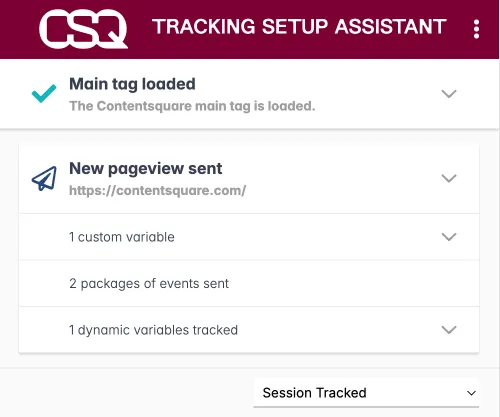
Download our Chrome Extension Contentsquare Tracking Setup Assistant ↗.
-
Browse your website and, looking at the extension, make sure that:
- A pageview is sent on every page, or major UI change,
- You are sending the desired custom vars,
- If needed, a transaction is sent.
Otherwise, look at our Troubleshooting section.
When data appears in Contentsquare
Section titled When data appears in ContentsquareOnce your tags are live, data shows up in your Contentsquare account about 3 hours after setup.