Dust
Connect Dust to Contentsquare to query your experience data from Dust.
Add the Contentsquare MCP server
Section titled Add the Contentsquare MCP server- Navigate to Dust.
- Navigate to Spaces.
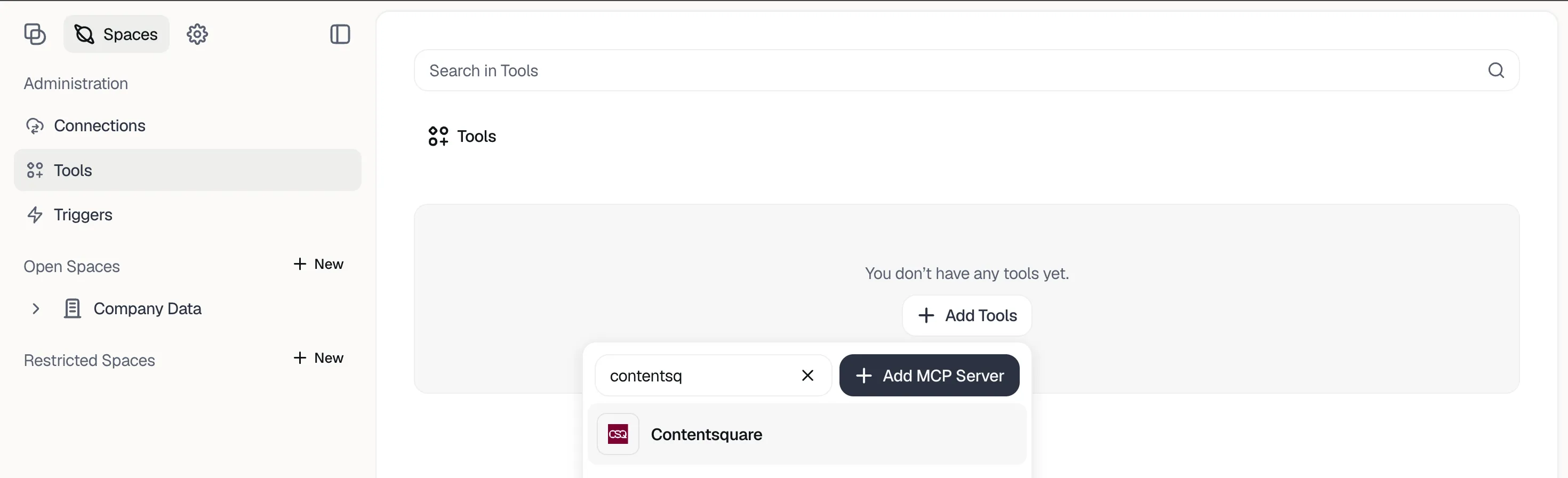
- Click Tools > Add Tools.
- Search for
Contentsquare. - Click the Contentsquare logo.
- Review the terms and click Next.
- Select Personal accounts and click Setup Connection.
- In the popup, grant Dust access to Contentsquare. Select the account you want to connect.
- Choose to grant access to your entire account or select specific projects.
- Click Allow.
Next steps
Section titled Next stepsOnce connected, ask your AI client a question such as "Which projects do you have access to?" to check the connection. See the MCP overview for the other supported clients.