

Troubleshooting
Requests are failing
Section titled Requests are failingIn order for Contentsquare to work, you need to make sure the following endpoints are not blocked by your network (VPN):
| Request | Endpoint | Detail |
|---|---|---|
| Config file | https://mobile-production.content-square.net | See Configuration |
| Experience Analytics data (EU) | https://m.csqtrk.nethttps://m.ba.contentsquare.nethttps://m.aa.contentsquare.net | See Sending data |
| Experience Analytics data (US) | https://m-aus1.contentsquare.nethttps://m.bf.contentsquare.nethttps://m.af.contentsquare.net | See Sending data |
| Product Analytics data | https://mh.bf.contentsquare.net | See Product Analytics |
| Monitoring | https://l.contentsquare.net | Used by the SDK to send SDK monitoring analysis in JSON format over HTTPS. |
| Session Replay data (EU) | https://ka-aeu1.contentsquare.nethttps://ka.ba.contentsquare.nethttps://ka.aa.contentsquare.net | See Session Replay requests |
| Session Replay data (US) | https://ka-aus1.contentsquare.nethttps://ka.bf.contentsquare.nethttps://ka.af.contentsquare.net | See Session Replay requests |
| Screenshot (EU) | https://s.contentsquare.nethttps://b.ba.contentsquare.nethttps://b.aa.contentsquare.net | See Screenshot capture |
| Screenshot (US) | https://s-aus1.contentsquare.nethttps://b.bf.contentsquare.nethttps://b.af.contentsquare.net | See Screenshot capture |
| Resources manager (EU) | https://srm.ba.contentsquare.nethttps://srm.aa.contentsquare.net | See Session Replay requests |
| Resources manager (US) | https://srm.bf.contentsquare.nethttps://srm.af.contentsquare.net | See Session Replay requests |
Error message "Contentsquare SDK cannot execute operation"
Section titled Error message "Contentsquare SDK cannot execute operation"If the following message appears in the logs:
CSLIB ℹ️ Info:⚠️ Contentsquare SDK cannot execute operation because it hasn't been started.It means SDK API calls were done incorrectly.
In this case: gestures and lifecycle events won't be tracked by the SDK.
Two possible explanations exist for this issue:
- The SDK is manually started and API calls were made before call to
start. - The SDK is automatically started and API calls were made before the
AppDelegate.willFinishLaunchingWithOptions. Ensure that it doesn’t happen or contact our support team if you have a specific need.
Providing a debug build for investigation
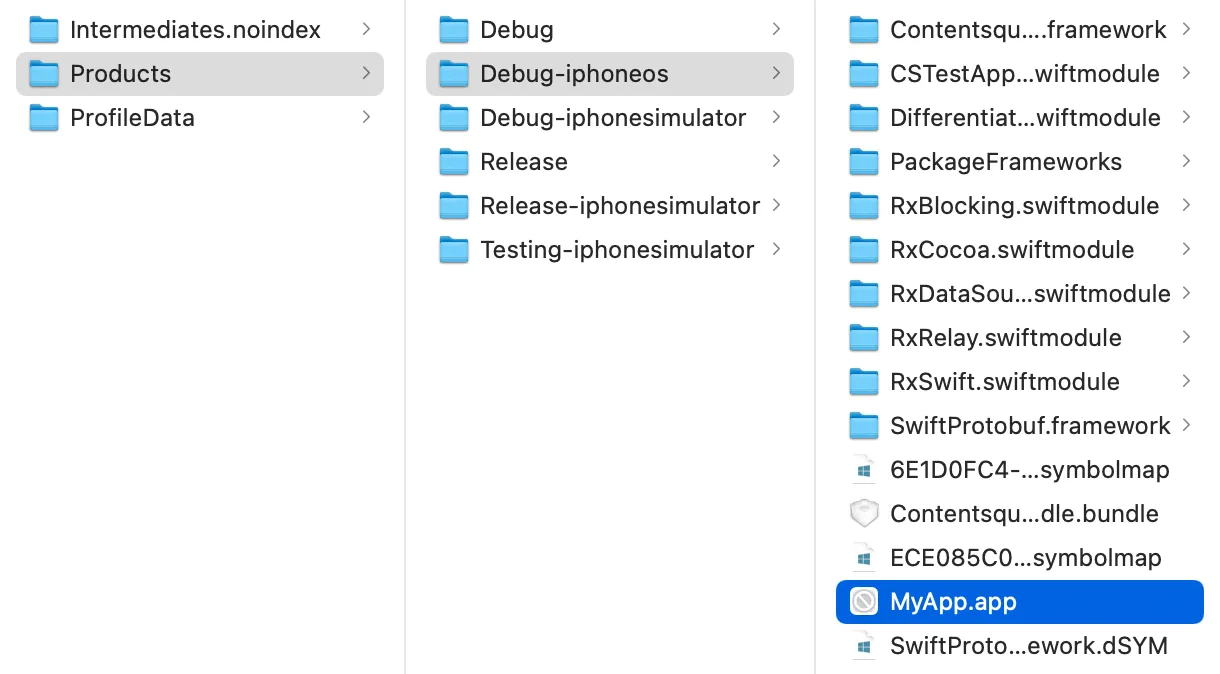
Section titled Providing a debug build for investigation- Build your app for iOS device (not simulator)
- Open the product folder for your app
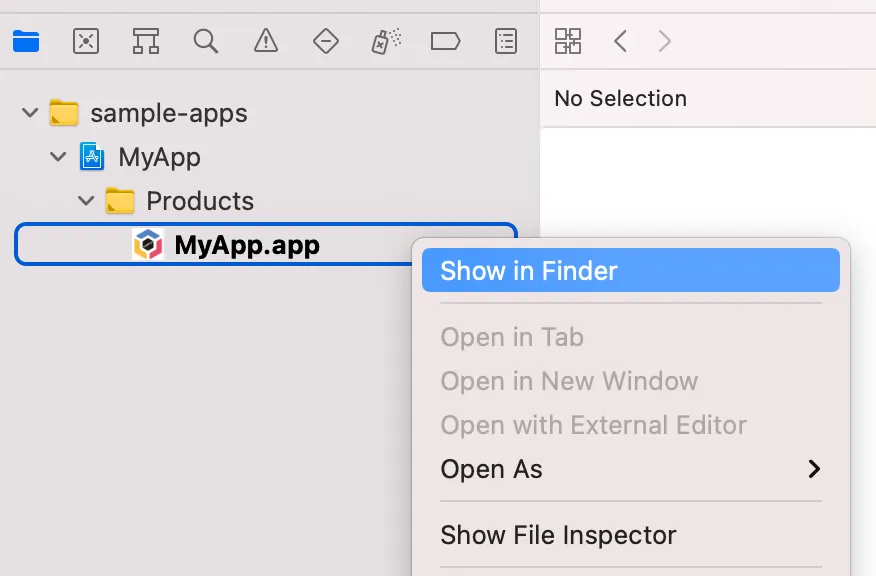
- Copy the .app from Debug-iphoneos and send it to the Contentsquare team
Wrong tag loaded in WebView
Section titled Wrong tag loaded in WebViewWhen using Manual tag injection for dual context (WebView and Browser tracking on the same webpage), the SDK injects a script that may load after the page, causing the wrong tag to load in the WebView. Use one of the following solutions:
-
Add your own user script before the webview loads the page:
let userScript = WKUserScript(source: "window.isWebView = true;",injectionTime: .atDocumentStart,forMainFrameOnly: false)webView.configuration.userContentController.addUserScript(userScript)Then make sure to include the added script variable in the webview check on the page itself:
function isWebView() {return navigator.userAgent.indexOf('CS_WebView') !== -1 ||typeof CSJavascriptBridge != 'undefined' ||window.CS_isWebView ||window.isWebView; // Your added variable}/// ... -
Add a query parameter to the URL of the page you are loading in the WebView:
URL(string: "https://www.apple.com/?isWebView=1")Then add it to the conditions in the page script itself:
function isWebView() {return navigator.userAgent.indexOf('CS_WebView') !== -1 ||typeof CSJavascriptBridge != 'undefined' ||window.CS_isWebView ||new URLSearchParams(window.location.search).get('isWebView') === '1';}/// ...